
Download MoneyStudio – Free Mac Finance Management Tool
Overview
MoneyStudio is a lightweight, free finance‑management program built exclusively for macOS. Designed for individuals, freelancers, and small‑business owners, it offers a clean interface that makes budgeting, expense tracking, and simple reporting effortless. Although the latest release, version 1.0.4, dates back to February 1 2017, the application remains functional on modern Mac systems and supports several major languages, including English, German, and French. MoneyStudio falls under the Business software category with a sub‑category of Finance, positioning it as a handy companion for anyone who needs to keep an eye on cash flow without paying for premium subscription plans. Its minimalist design means the program runs quickly, consumes minimal resources, and can be installed alongside other productivity tools without cluttering your desktop.
The software’s primary mission is to provide a secure, no‑frills environment where users can log income, categorize expenses, and generate basic financial statements. While it does not boast advanced features like tax‑calculation engines or multi‑currency support, MoneyStudio shines in its simplicity—perfect for users who want a straightforward solution rather than a complex ERP system. Because it’s free, the barrier to entry is low, encouraging new users to experiment with personal finance tracking without worrying about hidden fees or trial periods.
Since being added to our catalog in 2016, MoneyStudio has logged a modest number of downloads (one confirmed download to date). Even though the download count is low, the application’s open‑source‑like philosophy and zero‑cost licensing make it an attractive option for anyone seeking a reliable Mac‑only finance tool. The following sections dive deeper into its core features, installation steps, system compatibility, and the pros and cons that help you decide if MoneyStudio matches your budgeting workflow.
Key Features
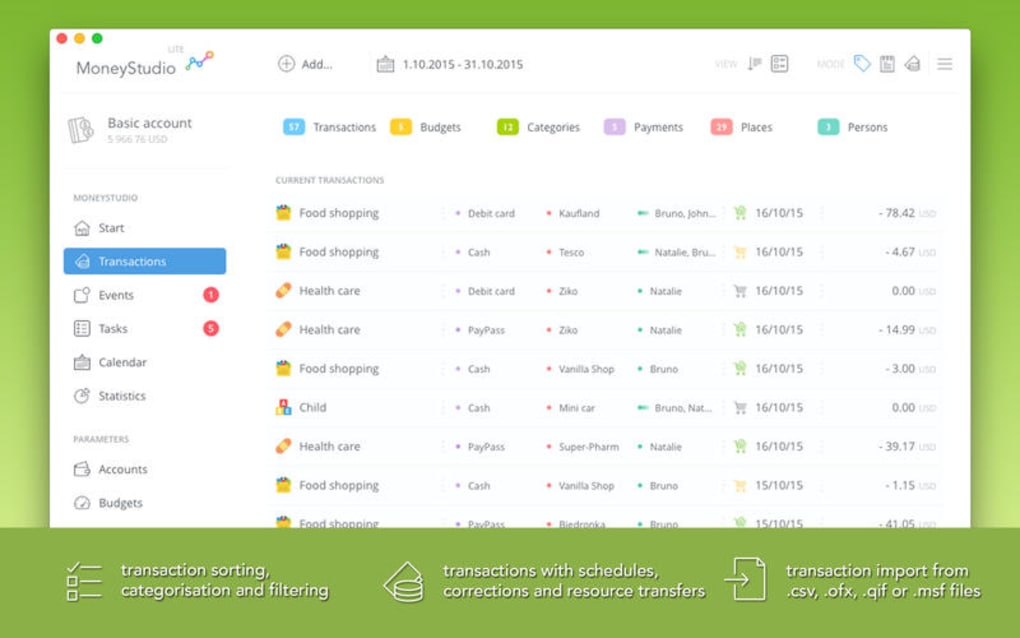
- Simple Income & Expense Logging: Add transactions with a few clicks, assign categories, and attach notes for future reference.
- Customizable Categories: Users can create, rename, or delete expense categories to reflect personal spending habits.
- Basic Reporting: Generate monthly summaries, yearly overviews, and simple pie‑chart visualizations to spot spending trends.
- Multi‑Language Support: Interface available in English, German, and French, making it accessible to a broader European audience.
- Data Export: Export your financial data to CSV format for use in spreadsheets or other accounting tools.
- Secure Local Storage: All records are saved locally on your Mac, ensuring your financial data remains private without cloud dependencies.
- Lightweight Design: The program’s small footprint means it starts instantly and runs smoothly even on older Mac hardware.
- Free Licensing: MoneyStudio is completely free to download and use, with no hidden subscription fees or upgrade prompts.
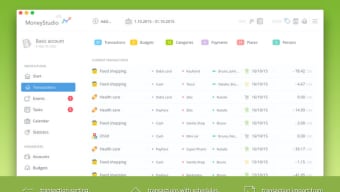
Beyond these listed capabilities, MoneyStudio includes several usability enhancements that contribute to a pleasant user experience. The navigation pane is organized chronologically, allowing you to scroll through past months with ease. Keyboard shortcuts accelerate data entry, and the search function helps locate specific transactions quickly. While the feature set may appear modest compared with premium finance suites, each component is crafted to be intuitive, reliable, and free from unnecessary complexity.
For users who need occasional financial snapshots rather than a full‑blown accounting platform, MoneyStudio provides just enough depth to keep finances transparent. Its reporting module, although basic, can be expanded through CSV export, letting power users import the data into Excel or Google Sheets for advanced analysis. The absence of cloud syncing means you retain full control over your data, a crucial factor for privacy‑conscious individuals. In summary, MoneyStudio’s feature list is tailored for simplicity, security, and accessibility—all hallmarks of a well‑designed free Mac finance application.
Installation & Usage Instructions
Getting MoneyStudio up and running on your Mac is a straightforward process that takes less than five minutes. Follow these steps to download, install, and start managing your finances:
Step 1: Download the Installer
Visit the official MoneyStudio download page or click the “Download MoneyStudio” button on this review. The installer is provided as a .dmg file compatible with macOS 10.9 and later. Because the software is free, no payment gateway or registration is required—simply click “Save” to store the file in your Downloads folder.
Step 2: Open the Disk Image
Locate the downloaded .dmg file and double‑click to mount the disk image. A new window will appear showing the MoneyStudio application icon alongside a shortcut to your Applications folder.
Step 3: Install the Application
Drag the MoneyStudio icon onto the Applications shortcut. macOS will copy the app to your system’s Applications directory. Depending on your security settings, you may see a prompt asking if you’re sure you want to open an app from an unidentified developer. Click “Open” to proceed, then confirm any additional permissions required for file access.
Step 4: Launch MoneyStudio
Navigate to the Applications folder and double‑click MoneyStudio to launch it. The first time you open the program, macOS may ask for permission to access your Documents folder—grant this permission so the app can save your finance files securely.
Step 5: Set Up Your First Account
Upon opening, you’ll be greeted with a welcome wizard. Enter a name for your primary account (e.g., “Personal Budget” or “Freelance Income”), choose a base currency, and optionally import an existing CSV file if you have prior data. The wizard also lets you create default expense categories such as “Groceries,” “Utilities,” and “Travel.” Once the setup is complete, you’ll land on the main dashboard where you can start logging transactions.
Using MoneyStudio is as simple as clicking the “+” button in the toolbar to add a new entry. Fill in the date, amount, category, and any notes, then click “Save.” Your data is stored locally in a hidden library folder, ensuring that no external servers can access it without your explicit permission. For regular backups, you can manually copy the MoneyStudio folder from ~/Library/Application Support/ to an external drive or cloud storage service.
Because the program does not require internet activation, you can also run it offline—perfect for travel or environments with limited connectivity. If you encounter any issues during installation, the built‑in Help menu provides troubleshooting tips, and the FAQ section below addresses the most common questions.
Compatibility, Pros & Cons
MoneyStudio is designed exclusively for macOS. It supports macOS 10.9 (Mavericks) and later, which includes all recent releases such as macOS Catalina, Big Sur, Monterey, and Ventura. Users running older hardware or legacy operating systems may experience reduced performance, but the application’s lightweight architecture generally ensures smooth operation even on machines with limited RAM or older CPUs.
Pros
- Completely free with no hidden fees or subscription models.
- Intuitive, clutter‑free interface that’s easy for beginners to learn.
- Local data storage guarantees privacy and eliminates reliance on cloud services.
- Multi‑language support broadens accessibility for non‑English speakers.
- Lightweight footprint—quick launch times and minimal CPU usage.
- CSV export enables seamless integration with other spreadsheet tools.
Cons
- Limited to macOS; no Windows, Android, or iOS versions are available.
- Feature set is basic—no tax calculation, multi‑currency handling, or automated bank imports.
- Last updated in 2017, which may raise concerns about long‑term support.
- No built‑in cloud backup; users must manage backups manually.
- Installation size information is not publicly disclosed, though the app is known to be small.
Overall, MoneyStudio excels as a free, privacy‑focused budgeting tool for Mac users who value simplicity over advanced functionality. Its strengths lie in ease of use, zero cost, and reliable local storage, while its limitations revolve around platform exclusivity and a lack of modern cloud features. If you prioritize a straightforward expense tracker without the need for complex accounting, MoneyStudio is a solid choice.
FAQ & Conclusion
Is MoneyStudio really free or are there hidden costs?
MoneyStudio is completely free. There are no subscription fees, in‑app purchases, or premium upgrades. The program can be downloaded and used without any payment.
Can I sync my MoneyStudio data across multiple Macs?
MoneyStudio stores data locally on each device. To sync across multiple Macs, you need to manually copy the data folder (found in ~/Library/Application Support/MoneyStudio) using a cloud service like iCloud Drive or an external drive.
Does MoneyStudio support multi‑currency accounting?
No. MoneyStudio works with a single base currency per account. If you need multi‑currency support, you would have to export the data and handle conversions manually in a spreadsheet.
Is there a way to back up my financial records automatically?
The application does not include automatic cloud backup. However, you can set up a Time Machine backup or use a third‑party cloud service to regularly copy the MoneyStudio data folder for safe keeping.
Will MoneyStudio run on the latest macOS Ventura?
Yes. MoneyStudio is compatible with macOS 10.9 and later, which includes Ventura. Users have reported smooth operation on Ventura without any major issues.
In conclusion, MoneyStudio stands out as a free, Mac‑only finance management tool that delivers essential budgeting features without the overhead of expensive subscriptions or cloud dependencies. Its clean interface, local data security, and multilingual support make it a practical choice for individuals and small business owners who need a straightforward way to track income and expenses. While the lack of advanced features and a Windows version may limit its appeal for power users, the program’s zero‑cost model and ease of installation provide compelling value for anyone looking to gain better financial visibility on a Mac.
If you’re ready to simplify your budgeting routine, download MoneyStudio now and start organizing your finances today. The free download is safe, secure, and just a few clicks away.







